I applied for a sales role with an app partner in the Shopify ecosystem in March of 2026. Their product offers merchants the ability to quickly and easily run A/B tests across their storefront. They had an Inspirations Library on their site, which was a collection of 31 experiments you could run, all based on real customer examples from the top-growing brands. I wanted to explore what the agentic version of this might look like.
I built this from the perspective of a sales person working at this company. I decided to only allow for selecting a single competitor brand for the MVP. The final output is a customer-ready google slides deck of up to 25 test slides, each color-coded by category (PDP, Collection, Cart, Search, Loyalty, Personalization), with hypothesis, variant description, and embedded competitor screenshot.
What I was trying to create was the kind of deliverable that a CRO agency would normally put together by hand. Browsing competitor sites, screenshotting features, writing up hypotheses, and formatting slides.
Here’s an example of one of the experiments that it recommends:
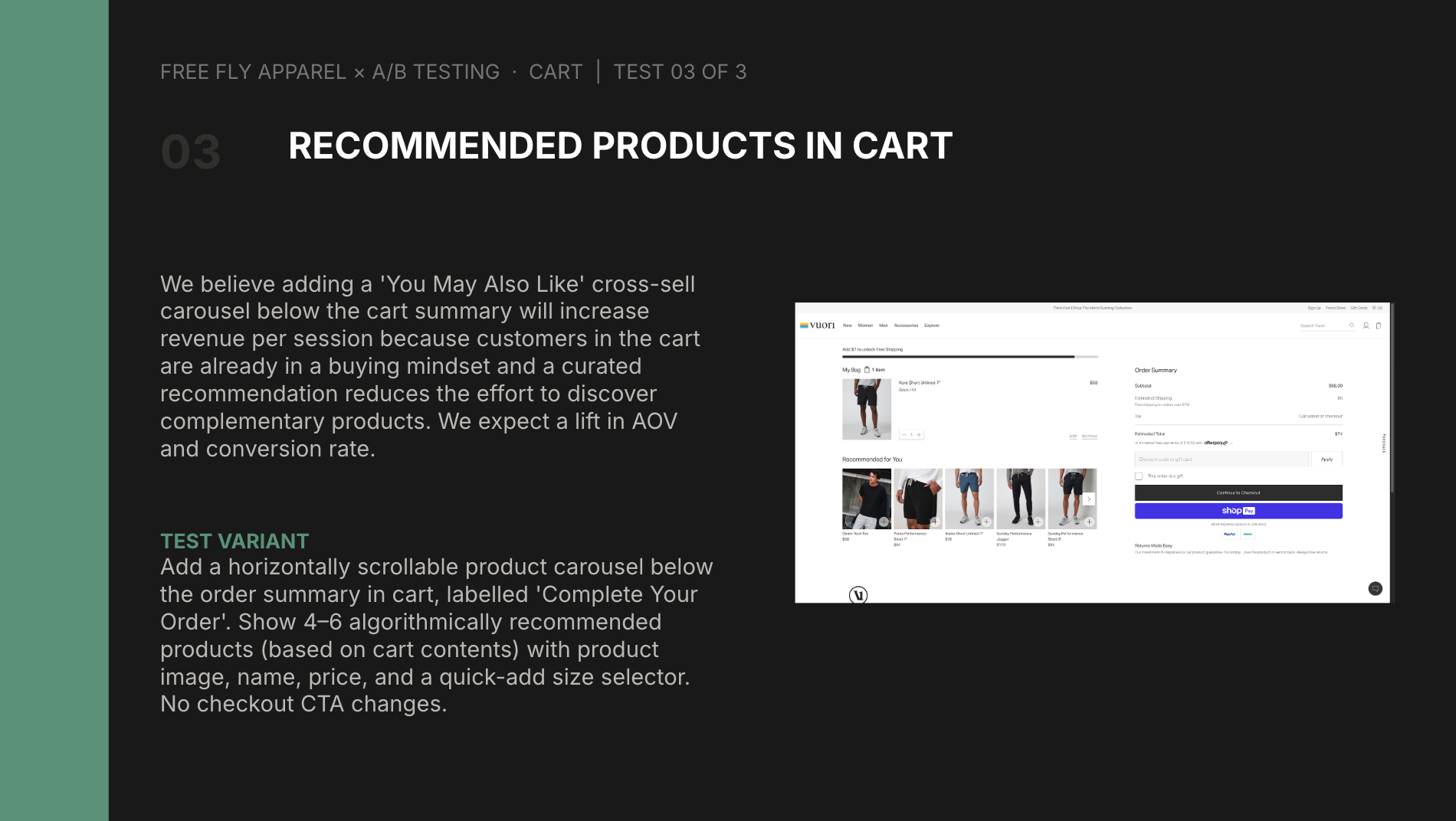
If you want to see what the completed deck looks like, here’s one that I ran for Thursday Boots <> Tecovas.
How it works
Once the skill is invoked in Claude Code you just need to give it a target brand (who you want test ideas for), competitor brand (who you are taking inspo from), and the number of experiments.
The CRO auditor agents will crawl both sites in parallel. Once they’re finished they provide an overview and proposed tests. You need to confirm you want to proceed before it goes ahead and creates the deck. This is intentional because the agent isn’t perfect. The crawler makes mistakes on client-side rendered features like BNPL widgets or color swatches on product cards. I added some friction here so I could verify manually.
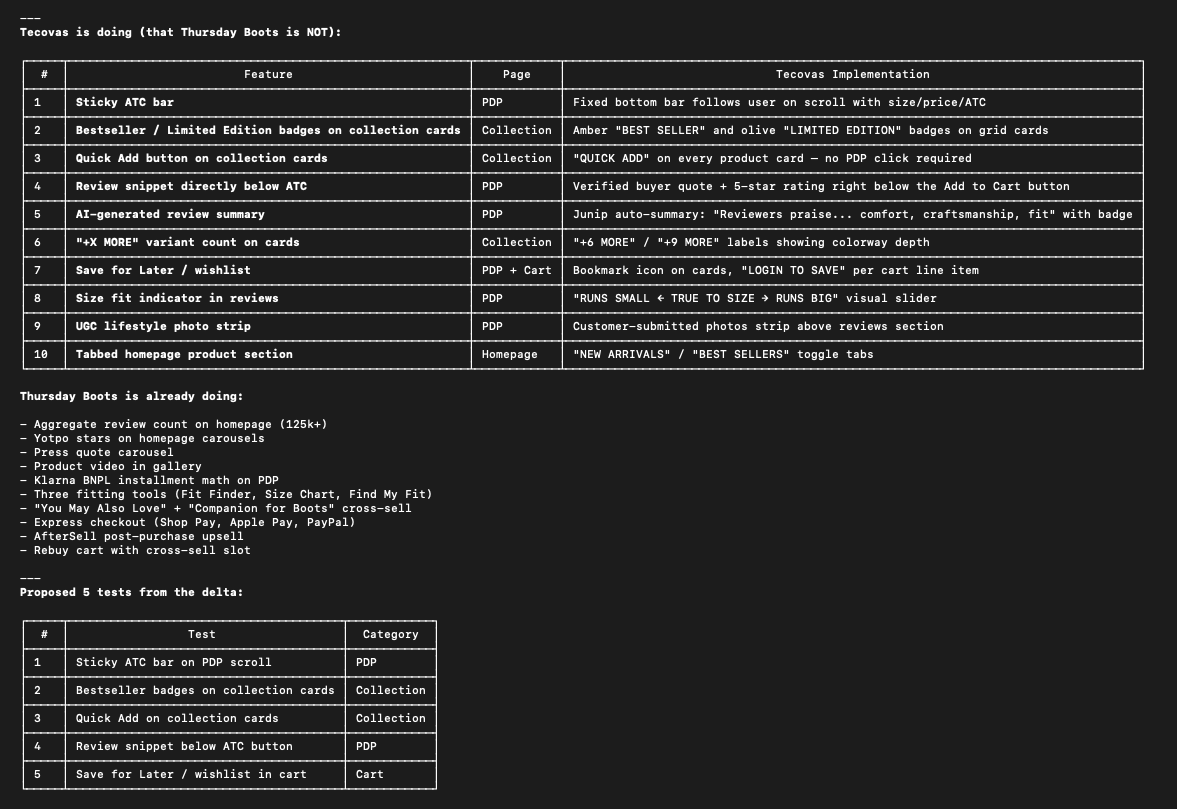
Once you give it the go-ahead it’s pretty straightforward from there. Template is duplicated, Python script generates Slides API batch requests, and screenshot agents run in parallel to capture competitor UI elements.
The good, the bad, and the ugly
Good
-
Overall look and feel of the deck is customer ready. Color-coded slides, brand logos, competitor screenshots, structured hypotheses.
-
Parallel agents work as intended. Both the CRO site crawl and screenshot subagents work simultaneously.
-
Template duplication. The Google Slides API has a 133-request-per-batch
limit. My first approach needed ~700 requests to build a deck from scratch. Switching to duplicateObject (copying from a pre-styled template) brought it down to ~160 across 4 batches.
Bad
-
It takes ~30 minutes end-to-end for 10 experiments. Yes, there’s benefits to being able to run this agent in parallel, but overall this is too slow.
-
Screenshot quality is inconsistent. There are scenarios where the image that it embeds does not fully capture the relevant feature/experience the experiment recommends.
-
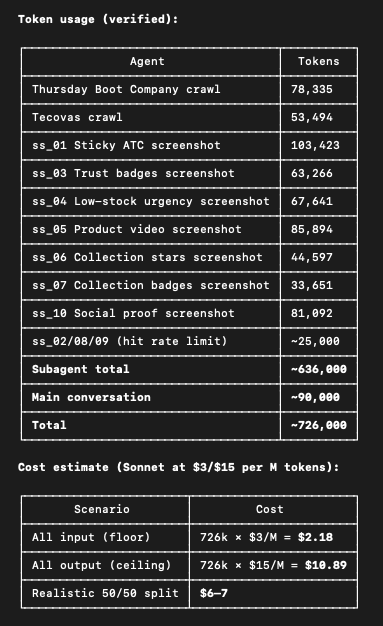
It’s somewhat expensive to run. It was tough to get an exact cost because I was not running this via API. But likely that it costs between $6-$7 per run.
Ugly
-
The accuracy of the experiments and findings is simply not high enough. In testing, I’ve seen as many as 60% of the gaps the agent identifies being incorrect. For example, it recommends implementing a BNPL banner but when you visit the site the target brand is already doing this. This is why the skill pauses for review before building the deck.
-
Over-reliant on browser use. This is a brittle approach, with issues like Cloudflare blocking, geo-targeting popups, lazy-loaded content the crawler never sees. The list goes on.
What would I change?
Narrow the CRO agent scope to a single surface (e.g. PDP or Cart) in order to iterate and improve on accuracy. Being able to trust the gaps identified by the agent is the single most important part of this skill. It’s what would take this from an MVP and move it closer to a working product.
I suspect that I could create a checklist of elements per surface for the agent to detect (e.g. for PDP look for BNPL banner, trust icons, etc). Theoretically, this would give me more flexibility in how I prompt the subagent, and what tools I give it access to.
This is hard though, because websites are constantly changing. So right now I’m constrained by my ability to review the experiments manually prior to the deck being created. My best guess in terms of solving this is what’s outlined in this video. Essentially you create a snapshot of the website at the point in time where the audit runs, and use that as the ground truth for evaluation. The snapshot approach solves the “website is always changing” problem because you’re not re-crawling live sites every time you iterate, you’re running against a frozen state you’ve already verified by hand.
I’ve still got so much to learn in order to get to this point, but something to strive for no doubt.